running aeon vllm on gx10/dgx-spark and build snake with it
/ 14 min read
Table of Contents
A while back I got the ASUS Ascent GX10 talking to pi via ds4. That was DeepSeek V4 Flash on DwarfStar. This evening I went the other direction and put another stack on the box: the aeon-vllm-ultimate container, which is a single image built from source for the GB10 / sm_121a and serves the whole AEON fleet — Gemma-4-26B, Qwen3.6-27B, Qwen3.6-35B-A3B — with DFlash speculative decoding, NVFP4 weights and an FP8 KV cache.
The goal was simple: get one of these models serving an OpenAI-compatible endpoint on the LAN, point pi at it, and see if a fully local model on my own hardware can do real coding work. Spoiler: it can, and it built me a Snake clone. But the road there included locking myself out of the machine, which is the part actually worth writing down.
What I was setting up
The recommended daily-driver recipe is the Qwen3.6-27B multimodal NVFP4-MTP body paired with a z-lab DFlash drafter and an FP8 KV cache. The container is genuinely a “pull and run” affair — no local build required, the heavy lifting (a source build for sm_121a, three carried-but-unmerged upstream PRs, the DFlash spec-decode stack) is already baked into the image.
I pulled the image, verified the version inside the container (0.25.0+aeon.sm121a.dflash), and grabbed the two model repos. Small gotcha: git-lfs isn’t installed on the host, but the container ships the hf CLI, so I just ran the downloads through the container into a mounted directory. Bonus: that sidesteps the symlink-into-HF-cache pitfall the README warns about, because hf download --local-dir writes real files. The body is ~27 GB, the drafter ~3.3 GB.
The part where I locked myself out
Here’s the mistake. When I launched the server I set --gpu-memory-utilization 0.85. On a discrete GPU that’s a perfectly reasonable “give vLLM most of the VRAM” value. I even talked myself into it: vLLM would be the sole GPU load, so why not go high?
The GX10 does not have discrete VRAM. The GB10 is a unified memory machine — one 119 GB LPDDR5X pool shared by the CPU and the GPU. So --gpu-memory-utilization 0.85 doesn’t mean “85% of some separate video memory bank,” it means “reserve ~101 GB of the machine’s only memory.” That starves the host OS.
What that looks like from the outside is genuinely confusing at first. The kernel stayed completely alive — ping was steady at a few milliseconds the whole time. But every userspace process that needed to fork just… stalled. SSH would accept the TCP connection on port 22 and then hang forever during the banner exchange, because sshd couldn’t spawn a login shell. vLLM never opened its port either. The box was up, reachable, and totally unusable.
To make it worse, I’d started the container with --restart unless-stopped. So even if the OOM killer eventually reaped it, Docker would just bring it back and re-thrash. This is the kind of config that survives reboots specifically to keep hurting you.
I couldn’t get a shell to fix it. I tried hammering SSH in a tight retry loop hoping to catch a window between an OOM-kill and the restart — 40 attempts, then 80 — but the container never actually died, it just sat there pinning memory during CUDA graph capture. No window ever opened.
In the end the only way out was a hard reset. But a hard reset with --restart unless-stopped set is its own trap: the container would auto-start on boot and re-lock the machine before I could stop it. So the recovery was a race — a ssh loop firing a one-shot command that, the instant it landed a session, would disable the restart policy and stop every container in one go:
CMD='for c in $(docker ps -aq); do docker update --restart=no $c; done; docker stop -t 0 $(docker ps -q); echo ALLSTOPPED'for i in $(seq 1 300); do out=$(ssh -o ConnectTimeout=5 -o BatchMode=yes gx10 "$CMD" 2>&1) echo "$out" | grep -q ALLSTOPPED && { echo "caught on $i"; break; } sleep 3doneIt landed on attempt 13, right in the early-boot window before Docker had fully wound the container back up. Machine recovered, 115 GB free, all restart policies set to no. Crisis over.
Doing it right
The fix is almost boring: the vendor quickstart uses --gpu-memory-utilization 0.60 for exactly this reason, and the README explicitly says keep it ≤ 0.88 on a Spark. I relaunched with 0.60, dropped --max-model-len from 229376 to a saner 131072 for the first boot, and set --restart no until I’d actually seen it come up healthy.
This time SSH stayed responsive throughout — 44 to 73 GB free during the whole boot and autotune. The first cold boot is slow (~13–16 minutes) because torch.compile plus the FlashInfer fp4_gemm autotuning has to run, but I mounted a persistent cache volume so subsequent boots should warm up in a couple of minutes.
The serve command that actually works:
docker run -d --name aeon-vllm --gpus all --ipc=host --shm-size=16g --net=host \ -e VLLM_USE_FLASHINFER_SAMPLER=1 \ -v $HOME/vllm-models/body:/model:ro \ -v $HOME/vllm-models/drafter:/drafter:ro \ -v $HOME/vllm-cache:/root/.cache/vllm \ --entrypoint vllm ghcr.io/aeon-7/aeon-vllm-ultimate:latest \ serve /model --port 8001 \ --served-model-name aeon aeon-fast aeon-deep aeon-ultimate \ --quantization modelopt --kv-cache-dtype fp8_e4m3 \ --attention-backend TRITON_ATTN \ --max-model-len 131072 --gpu-memory-utilization 0.60 \ --enable-chunked-prefill --enable-prefix-caching \ --reasoning-parser qwen3 --tool-call-parser qwen3_coder --enable-auto-tool-choice \ --speculative-config '{"method":"dflash","model":"/drafter","num_speculative_tokens":12,"attention_backend":"TRITON_ATTN"}' \ --trust-remote-codeI put it on :8001 deliberately so it doesn’t collide with ds4’s :8000. It reports a KV cache of ~515k tokens and about 3.9x concurrency at the 131k context length. One small thing worth knowing: because --kv-cache-dtype is FP8 here rather than NVFP4 — DFlash is non-causal and NVFP4 KV isn’t compatible with it on sm_121a today — you trade the ~3x KV-capacity trick for the DFlash throughput win. That’s the intended pairing for this recipe.
Wiring it into pi
pi reads custom providers from ~/.pi/agent/models.json, and I already had ds4 and a couple of MLX entries in there. Adding the vLLM endpoint was a matter of another provider block:
{ "aeon": { "name": "AEON vLLM (gx10)", "baseUrl": "http://<ip>>:8001/v1", "api": "openai-completions", "apiKey": "aeon-local", "compat": { "supportsDeveloperRole": false, "supportsReasoningEffort": false, "maxTokensField": "max_tokens", "supportsStrictMode": false, "thinkingFormat": "qwen-chat-template" }, "models": [ { "id": "aeon", "name": "Qwen3.6-27B AEON (gx10 vLLM)", "reasoning": true, "input": ["text", "image"], "contextWindow": 131072, "maxTokens": 32768, "cost": { "input": 0, "output": 0, "cacheRead": 0, "cacheWrite": 0 } } ] }}The setting that took a moment of thought was thinkingFormat. The server runs with a --reasoning-parser qwen3, which means the chain-of-thought comes back in a separate reasoning field and content stays null until the model closes the think block. This tripped me up during the smoke test — a short max_tokens got entirely consumed by thinking, so content was null with finish_reason: length, and it looked like the model wasn’t answering. It was; it just hadn’t stopped thinking yet.
The right knob is thinkingFormat: "qwen-chat-template", which tells pi to control thinking via chat_template_kwargs.enable_thinking — the same mechanism I confirmed by hand (enable_thinking:false gives you a direct answer). apiKey is a dummy string; the server is keyless, but pi needs auth to be present before it will list a model.
pi --list-models | rg aeon showed it, and a quick non-interactive run confirmed the round trip:
pi --model aeon/aeon -p "Reply with exactly: gx10 aeon online"# -> gx10 aeon onlineSnake
With the plumbing done, the actual test: I asked pi, running entirely against the local Qwen3.6-27B on the GX10, to build a Snake clone. It produced a single self-contained snake.html — a Nokia-style green-LCD Snake, complete with a phone-body CSS frame, pixel font, and working game loop, in one file. It runs.
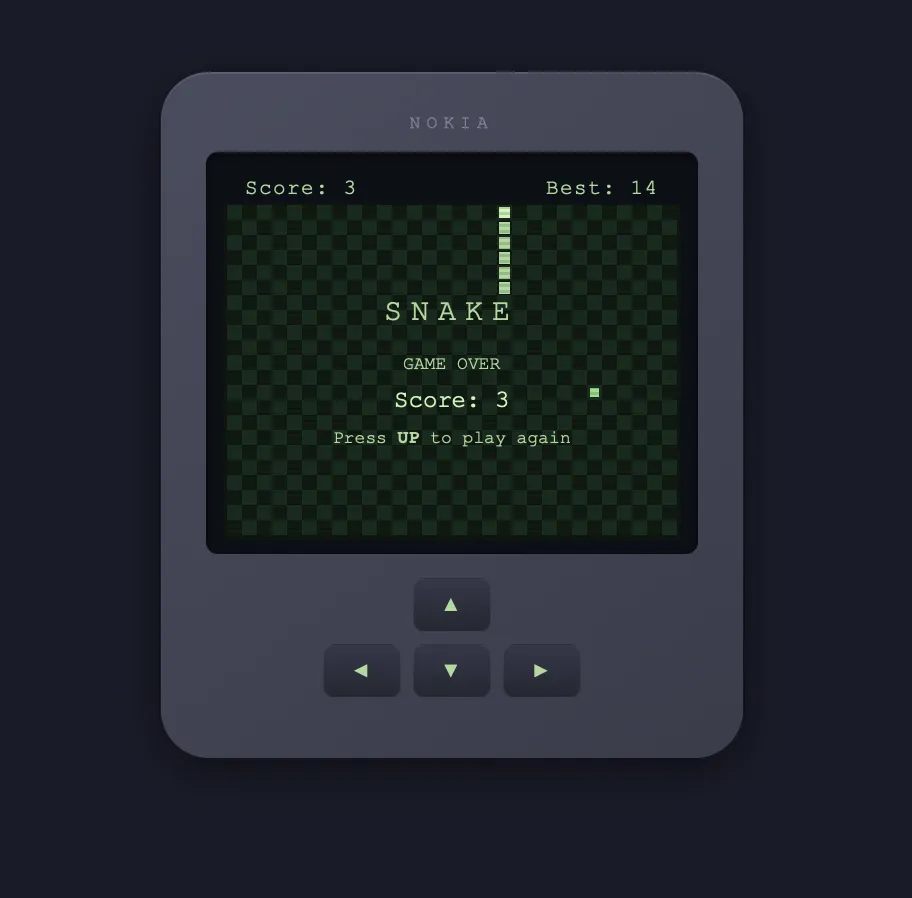 No cloud model in the loop, no API bill, just a 27B model on a small black box in the utility room drafting tokens with DFlash and a Mac sending it prompts over the LAN.
And because this body is the multimodal NVFP4-MTP checkpoint, I could close the loop: I fed the screenshot above back to the same local model and asked it to describe what it saw. It nailed it — the model that wrote the game also read its own rendered game-over screen:
observation: game-over state rendered correctly
details: - Phone shell with rounded corners, "NOKIA" brand label at top - LCD screen shows game-over overlay: "SNAKE", "GAME OVER", "Score: 3", "Press UP to play   again" - Background grid still visible with the snake (vertical, ~6 segments, right edge of screen)   and food (single pixel, lower right) - Score bar: Score: 3, Best: 14 - Keypad with 4 directional buttons (▲ ◄ ▼ ►) visible below screen - Dark background behind the phone
The game rendered correctly through game-over state. High score (14) was previously saved,current run scored 3. The snake appears to have been moving upward when it died.
That’s the whole point of this exercise for me. The ds4 setup proved the GX10 could serve a model to pi; this one proves it can serve a coding-capable, image-reading one well enough to one-shot a small working app and then critique its own output.
A quick throughput benchmark
Before trusting the box for real work I wanted a rough tokens-per-second number — pure performance, not answer quality. Handily, vllm bench serve ships inside the container, so there’s nothing to install; it drives load against the running server and prints the standard metrics: output throughput, TTFT (time to first token), TPOT (time per output token) and ITL (inter-token latency), plus — because this build does speculative decoding — DFlash acceptance stats.
I ran single-stream (--max-concurrency 1), which gives the clean decode-speed headline number. First try used the built-in random dataset:
# random 1024-in / 512-out, 20 prompts, concurrency 1Output token throughput: 18.19 tok/sTPOT (p50): 52.9 msDFlash acceptance: 14.1%18 tok/s looked low against the vendor’s published ~38–56 tok/s, and the acceptance rate explained why: random tokens are the worst possible case for speculative decoding. The little DFlash drafter can’t predict the continuation of noise, so almost nothing it drafts gets accepted (14%), and you’re left paying near-raw decode cost. It’s a classic benchmarking trap — a synthetic dataset that quietly defeats the exact feature you’re trying to measure.
So I re-ran on ShareGPT, i.e. real conversational prompts, which is what the vendor benchmarks against too:
# ShareGPT, 20 prompts, concurrency 1Output token throughput: 23.64 tok/sTTFT (p50): 334 msTPOT (p50): 37.7 msDFlash acceptance: 20.9% (accept length 3.51) pos0 73% → pos11 3%Realistic prompts lift acceptance from 14% to 21% and pull TPOT down from ~53 ms to ~38 ms — a ~30% single-stream speedup purely from the drafter landing more tokens. The per-position acceptance curve tells the story: position 0 accepts 73% of the time, then it decays as the drafter tries to guess further ahead. That’s exactly the shape you expect from DFlash, and it’s why the effective speed is so workload-dependent.
A few honest caveats on these numbers: ShareGPT is general chat, so it sits below the vendor’s coding/extraction category numbers (those prompts are far more predictable and draft better); 20 prompts is a smoke-test sample, not a rigorous run; and this is single-stream only — the interesting throughput story is the 1→64 concurrency sweep, which is a follow-up. But as a sanity check it’s enough: ~24 tok/s single-stream on real prompts, sub-350 ms to first token, no failures.
Takeaways
- Unified memory is not VRAM. The single biggest lesson. On a GB10,
--gpu-memory-utilizationcarves out of the same pool the OS lives in. 0.85 is a discrete-GPU habit that will lock you out of a Spark. Stay at 0.60 unless you’ve measured the headroom. --restart unless-stoppedbefore you’ve validated a config is a footgun. If the config wedges the host, it wedges it again on every boot. Validate with--restart nofirst, promote later.- A live kernel with dead userspace is a memory-pressure signature. Ping works, SSH hangs at banner exchange, service ports never open — that’s fork starvation, not a network problem.
- The
qwen3reasoning parser meanscontentcan legitimately benullwhile the model thinks. Give it token headroom or turn thinking off; don’t assume it’s broken.
Next up: promote the server to auto-restart now that the config is proven, maybe raise gpu-mem-util toward 0.75 since vLLM is the dominant load, and try the bigger 35B-A3B model on the same image to see how it holds up for longer agent sessions.
Glossary
There’s a lot of jargon packed into this post. The terms below are linked from their first mention in the article, so you can jump down here and back.
Hardware
GX10
An OEM version of NVIDIA’s DGX Spark: a small desktop AI machine built around the GB10 chip. The specific unit here is the ASUS Ascent GX10.
DGX Spark
NVIDIA’s compact developer box for local AI, aimed at running large models on a desk rather than in a datacenter.
GB10
The Grace-Blackwell chip inside the Spark. Pairs an Arm CPU with a Blackwell GPU on one package sharing a single memory pool.
sm_121a
The CUDA compute-capability target for the GB10 GPU. Code has to be compiled specifically for this architecture; a build for the wrong sm_ target falls back to slow kernels or won’t run the FP4 paths at all.
Unified memory
One physical memory pool (119 GB of LPDDR5X here) shared by both CPU and GPU. Unlike a discrete GPU with its own VRAM, “GPU memory” and “system memory” are the same bytes — which is why over-reserving for the GPU starves the OS.
VRAM
The dedicated video memory on a traditional discrete GPU. The GX10 has none of this in the usual sense; that’s the whole trap in this post.
LPDDR5X
The low-power DDR memory technology used for the Spark’s unified pool.
Serving stack
vLLM
A high-throughput inference server for large language models, exposing an OpenAI-compatible API.
aeon-vllm-ultimate
The AEON project’s prebuilt vLLM container, compiled from source for the Spark and bundling the speculative-decoding stack.
OpenAI-compatible API
An HTTP endpoint that mimics OpenAI’s /v1/chat/completions shape, so any OpenAI client (like pi) can talk to it unchanged.
KV cache
The key/value tensors a model caches for tokens it has already processed, so it doesn’t recompute them each step. It’s the main consumer of memory during long-context generation.
FP8
An 8-bit floating-point format (fp8_e4m3 is 4 exponent, 3 mantissa bits). Used here for the KV cache to halve its memory footprint.
NVFP4
NVIDIA’s 4-bit floating-point format for Blackwell tensor cores. Used for the model weights (and optionally the KV cache) to shrink them at near-16-bit quality.
modelopt
NVIDIA’s model-optimization/quantization toolkit; the --quantization modelopt flag tells vLLM the checkpoint was quantized with it.
gpu-memory-utilization
The vLLM knob for what fraction of GPU memory to reserve. On unified memory it carves out of the shared pool, hence the lockout.
max-model-len
The maximum context length (in tokens) the server will accept per request; larger values reserve more KV cache.
Context window
How many tokens (prompt + output) the model can attend to at once. 131072 here.
CUDA graph capture
A startup phase where vLLM records and tunes (autotunes) GPU kernel launches for speed. It’s slow (~13–16 min cold here) and memory-hungry, which is why the lockout happened during it.
FlashInfer
A library of optimized attention/GEMM kernels vLLM uses; its fp4_gemm autotuning runs at boot.
Models & decoding
Qwen3.6-27B
The 27-billion-parameter Qwen model served here as the daily driver.
35B-A3B
A larger Qwen variant; “A3B” denotes a mixture-of-experts model with ~3B active parameters per token.
Multimodal
A model that accepts more than text; this checkpoint reads images too, which is how it described its own screenshot.
NVFP4-MTP checkpoint
The specific model file: NVFP4-quantized weights with a Multi-Token-Prediction head baked in.
MTP
Multi-Token Prediction: a technique where the model predicts several future tokens at once, usable as a self-speculation method.
DFlash
The AEON speculative-decoding method used here, pairing the big model with a small drafter model.
Drafter
A small fast model that proposes candidate tokens; the big model then verifies them in one pass. The z-lab DFlash drafter is ~3.3 GB.
Speculative decoding
The general trick of drafting several tokens cheaply and verifying them in a batch, boosting throughput when the draft is accepted.
Reasoning parser
Server-side logic (--reasoning-parser qwen3 here) that splits a model’s chain-of-thought into a separate reasoning field, leaving content for the final answer.
enable_thinking
The switch (passed via the chat template’s kwargs) that turns the model’s visible thinking on or off.
Quantization
Storing model weights at lower precision (e.g. 4-bit NVFP4 instead of 16-bit) to save memory and bandwidth, ideally with minimal quality loss.
Tooling
pi
The pi-coding-agent I run on the Mac; it talks to models over an OpenAI-compatible API and does the actual file edits.
models.json
pi’s config file (~/.pi/agent/models.json) for registering custom providers and models.
ds4
DwarfStar — the other local inference engine on the GX10, serving DeepSeek V4 Flash on port 8000 (from the previous post).
git-lfs
Git Large File Storage, used to fetch multi-gigabyte model weights from Hugging Face.
hf CLI
The Hugging Face command-line downloader, shipped inside the container so I didn’t need git-lfs on the host.
fork starvation
The failure mode where the kernel is alive but there’s no free memory to spawn new processes, so things like sshd sessions hang. The signature of the lockout.