eddo 0.1.0
/ 8 min read
Table of Contents
Eddo, my GTD-inspired todo app, just hit 0.1.0. This might not sound like much, but for a project that’s been in “alpha state” for years, it’s kind of a big deal. Or not, it’s probably still just me using this. I use it daily though, and from time to time I use it as a playground to experiment with new ideas to implement.
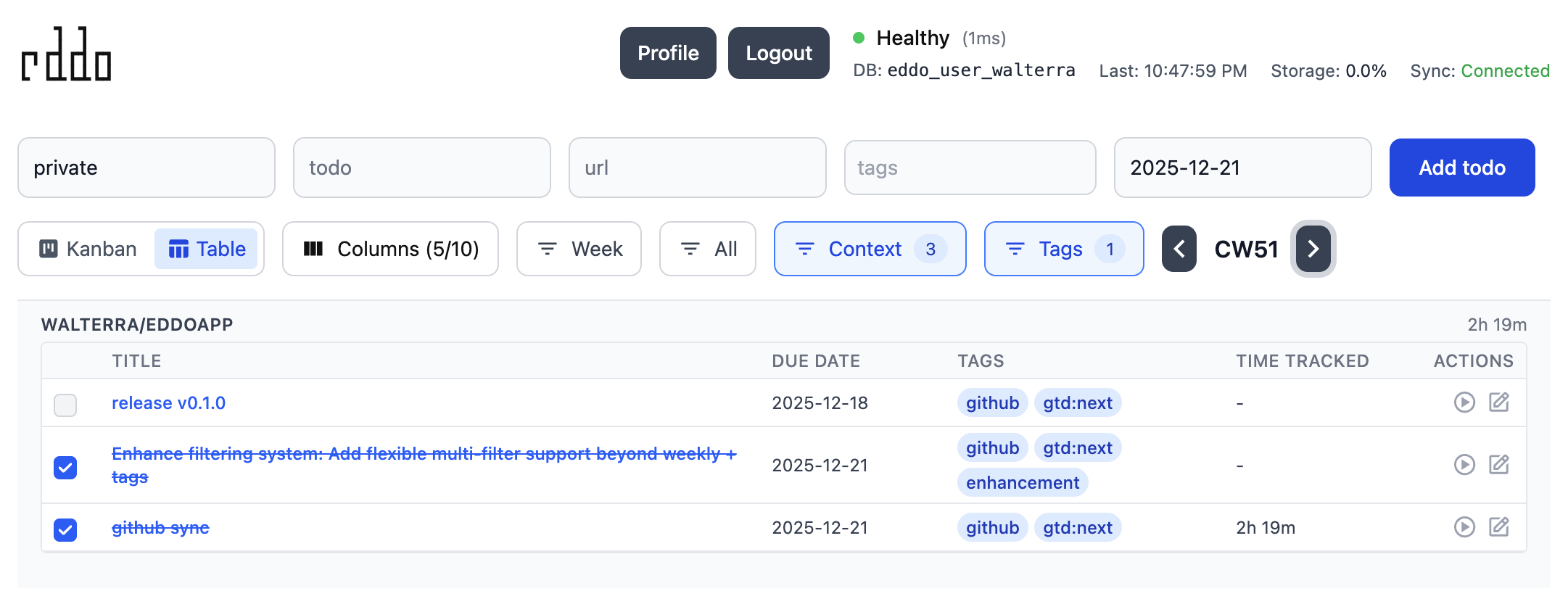
This blog post is about new features, but also about how I set up the repo and how I worked on it (cough vibecoding cough).
What’s in 0.1.0?
Major features:
- GitHub Issue Sync: Automatic one-way sync of GitHub issues and PRs with time tracking
- Tag-based repeat logic:
gtd:calendarvsgtd:habitrepeating behavior - Table view: Alternative to Kanban with customizable columns
- Multi-filter system: Filter by status, context, tags, and time ranges with state persistence
- TanStack Query integration: Better caching and real-time updates (see October recap)
- Thermal printer support for daily briefings (October recap)
Infrastructure:
- Automated CHANGELOG system with changesets and conventional commits
- Split design documents for better CouchDB performance
- Database structure consolidation across packages
The GitHub sync and tag-based repeats are the two features that make this feel like a real GTD tool.
GitHub Issue Sync: Finally, One Place for Everything
The biggest feature in 0.1.0 is GitHub issue synchronization. I work across multiple repositories - work, personal projects, open source contributions - and keeping track of assigned issues was becoming a pain. Some lived in GitHub’s notifications, others in my head, and nothing had proper time tracking.
Now Eddo automatically syncs all GitHub issues and PRs assigned to me into my todo system. Here’s how it works:
You set up a token and and some settings in user preferences and then it starts syncing.
Sync logic:
- Context mapping: Each repository becomes its own context (e.g.,
elastic/kibana,walterra/eddo) - Initial sync: Only pulls currently open issues (avoids importing ancient closed issues)
- Change detection: Only updates todos when issue title/description actually changes
- Deduplication: Uses external ID tracking so the same issue never creates duplicates
- Auto-completion: When issues close on GitHub, the corresponding todo completes automatically
- Auto-tagging: New synced issues get tagged with
gtd:nextto keep them actionable
Time tracking integration is where this gets interesting. I can start/stop timers on GitHub issues directly in Eddo, and track how much time I’m actually spending on each repository. The Telegram bot’s daily briefings now show:
📊 Active work:• work/some-repo: Fix this bug (2h 15m today)• walterra/eddo: GitHub sync feature (45m today)Implementation details:
The sync runs in the web-api package with a scheduled job that:
- Fetches issues from GitHub’s API (assigned to the authenticated user)
- Compares against existing todos using external IDs
- Only writes to the database when actual changes detected
- Handles edge cases like force-resyncing and SSO organizations
GTD Repeats: Calendar vs. Habit
The other major workflow improvement is tag-based repeat behavior (879e1bc). Previously, all repeating todos worked the same way - complete one, the next occurrence appears based on the due date.
This doesn’t work well for two different types of recurring tasks:
Calendar-based repeats (appointments, deadlines):
- “Weekly team meeting every Monday at 10am”
- Should repeat from the due date, regardless of when you mark it complete
- Tag:
gtd:calendar
Habit-based repeats (e.g. daily/weekly practices):
- “Mow the lawn every week”, “look after your plants every 3 days”, “work out every second day”
- Should repeat from the completion date to maintain consistent spacing
- Tag:
gtd:habit
Now todos check for these tags and handle repeats appropriately. Calendar events stay on schedule, and habits adapt to when you actually do them. Small change, but it makes the GTD workflow feel much more natural.
Switching to pi-coding-agent
For most of this work, I used pi-coding-agent instead of Claude Code. Mario Zechner (badlogic) built it as a minimal, opinionated alternative to the increasingly complex coding agents out there.
His blog post captures the frustration well:
Over the past few months, Claude Code has turned into a spaceship with 80% of functionality I have no use for. The system prompt and tools also change on every release, which breaks my workflows and changes model behavior. I hate that. Also, it flickers.
So I gave pi a try and it works for me. It supports my Claude subscription so I was sold easily. Since I use chezmoi to manage dot files, I have a single source of truth for my custom slash commands (can you believe codex cli still doesn’t have those) and skills.
Managing agent configs across multiple tools is annoying, but chezmoi makes it painless. My setup:
Commands (custom slash commands) live in ~/.local/share/chezmoi/dot_claude/commands/ and auto-sync to both:
~/.claude/commands/(Claude Code)~/.pi/agent/commands/(pi-coding-agent)
Now I can update /commit or /todo once and both agents get it.
Skills are handled differently. Mario’s pi-skills repo is vendored in chezmoi, and a skills-config.json controls which ones deploy:
{ "enabled": ["browser-tools"], "source": "vendor/pi-skills"}Another onchange script syncs enabled skills to ~/.pi/agent/skills/. Custom skills (like searxng-search) live directly in dot_pi/agent/skills/ and deploy alongside vendored ones.
The result: run chezmoi apply, and all agents get the latest commands and skills. Single source of truth, no manual copying, no drift between tools.
pi doesn’t support MCP which might be perplexing at first but is no surprise since this comes out of a certain no-thrills mindset. MCP tends to pollute your system prompts. For CLI coding agents it’s overkill because they can simply use, well, the CLI! MCP has its use in other embedded AI assistants though when you don’t have this direct way of accessing the system.
Mario put some agent skills out here: https://github.com/badlogic/pi-skills/tree/main
This made me finally find the time to look what skills actually are (I was hesitant originally and didn’t actually look into the concept since I remembered I couldn’t make much use of subagents). Using the brave-search skill I ran into rate-limiting issues quickly. Looking for alternatives I threw together a searxng-search skill.
It’s basically a rip-off of Mario’s brave-search - same structure, just swapping Brave’s API for a local SearXNG instance running in Docker. So far this worked nice for me for a few days. The code is here: https://github.com/badlogic/pi-skills/pull/2
Setup is simple:
cd searxng-searchnpm install./docker.sh setupThis spins up SearXNG locally on localhost:8080 with --restart unless-stopped, so it survives reboots. The skill includes two commands:
search.js "query" -n 10 --content- Search and optionally extract content as markdowncontent.js https://example.com- Extract readable content from any URL
The content extraction uses Mozilla’s Readability and Turndown to convert HTML to clean markdown - same approach as brave-search. When you run a search with --content, it fetches the actual page content for each result, not just snippets. This is incredibly useful when you need the agent to understand context from documentation or blog posts.
Nice bonus: This comes with a UI so if you load localhost:8080 in your browser you’ll get a local private search interface!
The Alpha Problem
For the longest time, Eddo lived in this weird state where the README warned:
⚠️ Alpha State: This is a proof of concept. While we encourage you to try it and provide feedback, don’t expect 100% data integrity across updates.
Which was true! But it also meant:
- No changelog tracking what changed between deploys
- Commit messages were inconsistent (
"fix stuff","wip","more changes") - No release notes to explain breaking changes
- Version numbers were basically meaningless
Well, it’s still kind of alpha, just now with pre-1.0.0 release tags.
Enter Changesets
I’ve used changesets before, and it’s great to create automated release notes. The workflow is simple:
- Make your changes
- Run
pnpm changeset addto document what changed - Describe the change in a small markdown file
- Commit everything together
- When ready to release,
pnpm changeset versionbumps versions and generates changelogs
Here’s what a changeset looks like:
---"@eddo/telegram-bot": minor---
Add thermal printer support for daily briefings on Epson TM-m30III
That’s it. The tooling handles the rest. Well, the above is the story if you write your changeset entries manually, I usually ask the coding agent to add one. Since by default this ends up quite verbose, I use this in the CLAUDE/AGENTS.md system prompt:
## CHANGELOG & Release Workflow
This project uses **Changesets** for automated CHANGELOG generation and version management, with **Commitizen** and **Commitlint** for enforcing conventional commits. Do not run changesets or commits by yourself, do them only when user explictly asks for it. replace "@eddo/\*" in the markdown file with the appropriate packages (one or more).
## Changesets
**Do NOT use `yarn changeset`** - it's interactive. Create files directly:
# .changeset/<descriptive-name>.md
---"@eddo/\*": patch|minor|major---Concise single-line description for CHANGELOG.md (not implementation details)

**Guidelines for changeset messages:**
- ✅ **Good**: "Add Jest testing infrastructure with 70% coverage thresholds and automated CI testing"- ❌ **Bad**: Listing every file changed, configuration option, or implementation detail- Focus on **user-facing value** or **high-level feature addition**- Keep it **one line** when possible (two max)- Think: "What would a user want to see in release notes?"
What’s next for Eddo?
It’s kind of surprising I never lost my todos over the years using this. Originally the whole thing lived just in local storage for a few years until I synced it up to a still local CouchDB instance. My next focus will be to work on making it simple to really deploy (and easily maintain and update) it somewhere.
I don’t expect anyone to pick this up and use it. It’s still quite brittle. But it has a fun view highlights now: Get a daily briefing on your thermal printer, chat with your todos via Telegram, import and sync your Github todos. I’ll keep going.
Full release notes on GitHub.